On this page
You've got a product, a handful of interested users, and questions that keep turning up in support messages. A subreddit seems like the obvious place to bring those conversations together. Then you open Reddit's creation menu and realize the difficult decision isn't which banner to upload. It's what people will do once they arrive.
Learning how to create a Reddit community means designing participation, not just completing setup. Your first month needs a clear purpose, useful conversations, and a moderation routine you can maintain alongside running your business.
Decide Whether a New Subreddit Is Worth Creating
Create a subreddit only if you can explain why someone should contribute there instead of somewhere established. A product name isn't enough. Members need a useful activity, such as troubleshooting a particular workflow, comparing implementation approaches, or sharing work for informed feedback.
Reddit's guidance before creating a community recommends checking for existing communities and assessing your ability to moderate. It also states that community names cannot be changed, including capitalization, and communities cannot be deleted. Treat creation as a durable commitment, not a disposable marketing experiment.
Test the audience gap
Start by searching for relevant subreddits. Compare member counts with recent posts, reply quality, and posting frequency. A smaller community with thoughtful answers may serve your audience better than a large but inactive one.
Write a purpose statement, then test it against concrete member questions:
- Audience: Specify who belongs, such as solo SaaS founders handling customer onboarding themselves.
- Problem: Name the task members need help completing, rather than a broad interest like entrepreneurship.
- Gap: Draft questions that established communities exclude, overlook, or answer without enough relevant context.
Say your proposed community concerns onboarding for developer tools. Questions about API activation, sandbox access, and technical documentation could create a coherent scope. General startup announcements probably wouldn't.
Test your capacity and name
Review your calendar before committing. Identify when you'll clear reported content, who can cover absences, and what you'll do if spam arrives while you're working elsewhere.
Check the name's spelling, capitalization, and meaning outside your company. A product-branded name suits customer support; a topic-based name leaves room for discussion involving competing products. Neither is better, but they create different expectations.
Launch threshold: Proceed only when you have a distinct purpose, dependable moderation coverage, and a name you're willing to keep.
If any check fails, participate in an existing community or narrow the concept. Creating another destination won't fix an unclear reason to gather.
Set Up the Community Step by Step
Use the creation flow to make membership expectations visible. Interface labels can change, so focus on the decisions behind the fields rather than memorizing button positions.
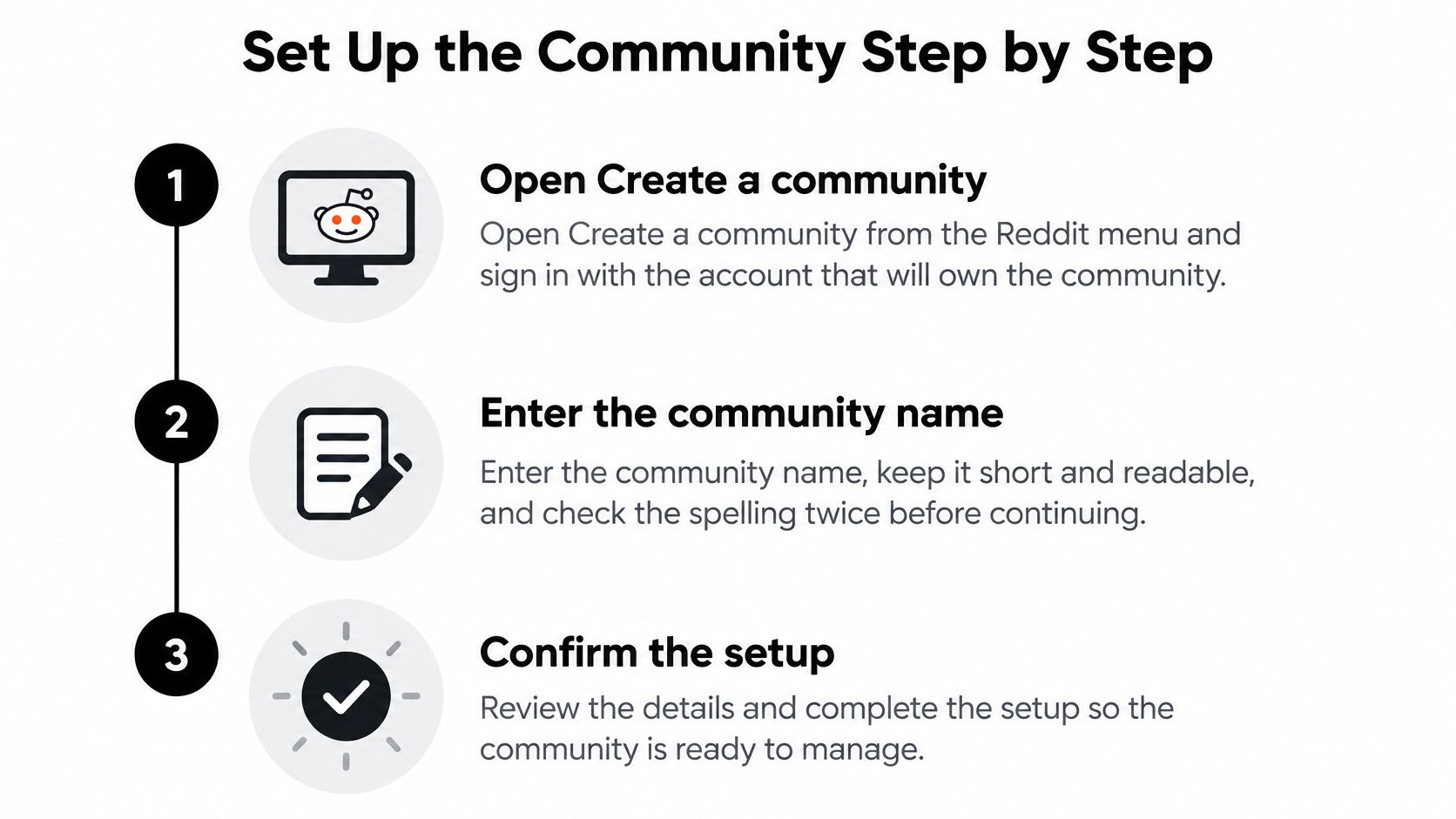
This visual summarizes the basic creation sequence.
Configure identity and access
-
Open Create a community. Sign in with the account you intend to use as the founding moderator, then open the creation option from Reddit's menu. Avoid launching from an account you rarely check.
-
Enter the name carefully. Keep it readable and understandable without an explanation. An obscure abbreviation might appeal to your team while confusing everyone you hope to recruit.
-
Write a practical description. State who the community serves, what members can post, and what falls outside its scope. For example: A community for developer-tool founders to troubleshoot onboarding, review documentation, and compare activation workflows. No unrelated product launches.
-
Choose relevant topics. Select the closest available topic categories rather than loosely related categories that merely promise reach. Reddit's community setup guidance describes selecting up to three topics during setup.
-
Add an icon and banner. Use legible artwork that helps visitors recognize the subject. Don't delay a useful community while polishing decorative assets.
-
Choose the community type. Use the comparison below to match access to your operating capacity. Restricted posting offers control, but it also adds an approval step for potential contributors.
Community types and who can view and post
| Community type | Who can view | Who can post | Best for |
|---|---|---|---|
| Public | Anyone | Anyone | Open discussion and broad audiences |
| Restricted | Anyone | Approved users only | Launches that need quality control |
| Private | Approved members only | Approved members only | Invite-only groups and early betas |
Configure the posting experience
- Review content controls and submission guidance. Enable the content formats your discussions need, explain required context, and start with balanced spam filtering. Maximum filtering isn't automatically safer if genuine members can't get their questions through.
For decisions beyond Reddit's interface, SubmitMySaas's guide to build an online community from scratch provides broader context for planning member value and participation.
Finish with a stranger test: ask someone unfamiliar with your idea to read the description and describe an acceptable post. If they can't, rewrite the description before inviting members.
Write Rules and an Onboarding Post That Set Expectations
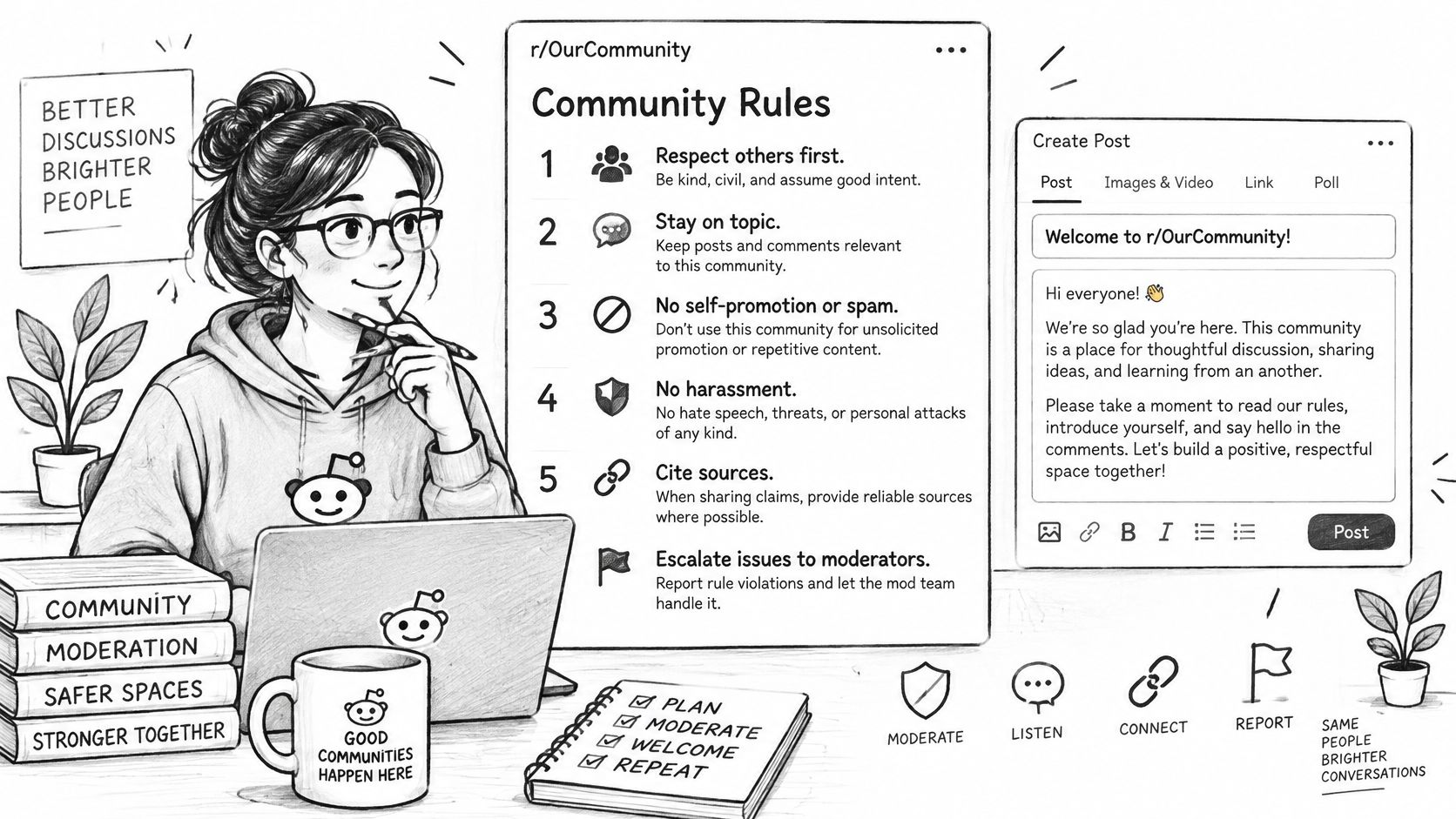
Write rules moderators can apply to actual submissions. A vague instruction to contribute value leaves members guessing and makes enforcement depend on personal taste.
The working environment should make those expectations easy to find.
Make each rule actionable
Use a compact rule set with clear boundaries:
- Respect people: Critique ideas without harassment, threats, or personal attacks.
- Stay within scope: Posts must concern the defined workflow and include enough context for someone to answer.
- Disclose promotion: Identify your relationship to any product you recommend. Decide whether standalone promotional posts belong in a designated thread or require moderator approval.
- Support factual claims: Link to documentation, original reporting, or another identifiable source when making claims readers may rely on.
- Follow moderation decisions: Direct appeals through modmail rather than restarting removed arguments in unrelated threads.
Don't copy a large subreddit's promotional policy without considering your audience. In Bazzly's checks, 59% of the 1,905 subreddits checked are strict about self-promotion, and 80% of those strict subreddits are over 1M members. Those findings describe the checked communities, not a universal rule your community must adopt.
Define an escalation approach privately: explain minor mistakes, record repeated breaches, and respond firmly to harassment. Reddit's Moderator Code of Conduct requires moderators to establish appropriate expectations, remain engaged, and enforce norms consistent with platform policies.
Give newcomers a submission they can copy
Your pinned onboarding post should demonstrate the expected level of detail. For a developer-onboarding community, use a sample submission with a goal, current workflow, attempted fix, and specific question. Add descriptive flair such as Question, Workflow Review, and Resource, and point members toward the recurring discussion.
This video offers another format for reviewing the community-management workflow.
Publish rules in the community's rules area and reference them in submission guidance. Before configuring enforcement, use this Reddit AutoModerator guide to distinguish checks you can automate from decisions requiring human judgment.
Our policy for posting through a user's own account follows Reddit's guidelines. The usual obligations still apply, including avoiding spam and respecting each subreddit's rules.
Launch and Seed the First 30 Days
Start with questions people can answer from experience. A prompt about which part of an API setup caused confusion is more approachable than a broad invitation to discuss developer experience. Members should know what kind of response would help.
Treat the first 30–50 posts as a controlled seeding phase, using specific prompts and recurring discussions rather than artificial activity; Reddit's community creation guidance also warns that using multiple accounts to inflate subscribers is spam.
That post range is a planning target, not proof that a community has succeeded. Don't publish filler to reach it.
Give early members useful work
Invite people who fit the audience and have something relevant to contribute. Ask a documentation specialist to critique an example, or invite a founder struggling with activation to describe the point where users stall. Don't ask people to upvote a launch announcement just to make it look popular.
Answer legitimate replies promptly, during response windows you can maintain. If a question needs specialist input, acknowledge it and ask a focused follow-up instead of pretending you know the answer.
A useful seed post starts a conversation. A disguised sales pitch asks members to supply attention.
Use a recurring discussion for questions that don't justify standalone posts. Keep its purpose consistent so returning members know where to ask for quick feedback.
30-day launch schedule for a new community
| Window | Focus | Target by end of window |
|---|---|---|
| Days 1-7 | Publish several seed prompts and the pinned onboarding post | Several high-value prompts live and every legitimate reply answered |
| Days 8-14 | Introduce a recurring discussion and invite relevant contributors | A recognizable discussion format with genuine member responses |
| Days 15-21 | Refine prompts around the questions members actually ask | Clearer submission guidance and identifiable repeat contributors |
| Days 22-30 | Compare unique visitors, comments per post and returning members week over week | 30 to 50 total posts and a week-over-week trend |
Evaluate participation rather than appearances
Use active-day and active-hour information to adjust scheduling once you have meaningful activity to inspect. An empty calendar isn't evidence that you chose the wrong posting hour.
At the end of the launch period, review recurring discussions published, median reply time, and members who returned in a subsequent week. Track returning contributors manually if necessary; don't confuse repeat posting with a platform-provided retention metric.
These community-building strategies can help you choose participation formats. Keep the formats that generate substantive exchanges, narrow prompts that attract vague answers, and stop publishing formats members consistently ignore.
Moderate Without Burning Out
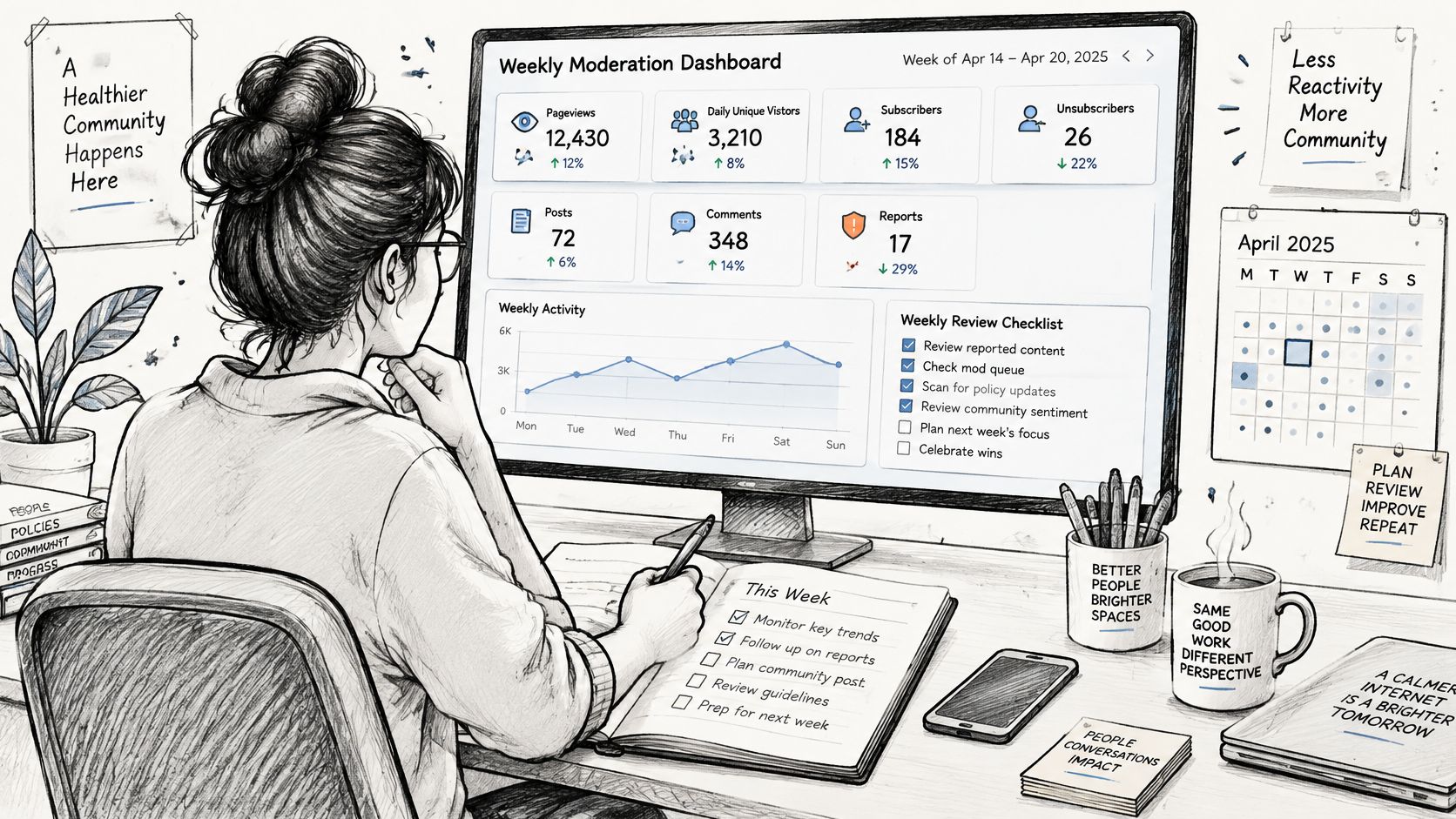
Build a weekly dashboard covering pageviews, daily unique visitors, subscribers, unsubscribers, posts, comments, reports, and removals. Reddit's Mod Insights documentation distinguishes community growth and activity from subscriber totals, helping you evaluate readership rather than membership alone.
Read those measures together. Rising traffic with few replies may indicate unclear prompts. More reports could reflect more problems, more attentive members, or both. Inspect the content before changing policy.
Keep the dashboard focused on decisions you can make.
Match intervention to the signal
Configure AutoModerator for recognizable spam patterns, prohibited links, and repetitive submissions. Use Reddit's relevant safety filters for abuse and suspected ban evasion rather than expecting keyword rules to solve every problem.
Audit removed content manually. A legitimate newcomer using the wrong phrase shouldn't disappear without a moderator checking whether the rule was appropriate.
- Promotional removals increasing: Clarify where recommendations belong and what disclosure requires.
- Off-topic removals increasing: Tighten the description or submission guidance before blaming newcomers.
- Legitimate posts repeatedly filtered: Adjust the automation and review affected submissions.
- Reports left unresolved: Reduce nonessential publishing work and arrange moderation coverage.
Log removals under consistent categories: off-topic, promotional, duplicate, abusive, low-effort, or suspected spam. Calculate each category's share monthly to separate recurring policy problems from isolated incidents.
Delegate before coverage fails
Set a queue-review deadline that fits your availability. Recruit help when you repeatedly miss it, not after members start asking whether anyone moderates the community.
Reddit's Community Digest can also inform staffing decisions through activity, removal, and moderator-capacity information. Use Reddit's moderator permissions guidance to give helpers only the access their responsibilities require.
Capacity rule: Don't recruit a moderator without defining what they can decide independently and what needs escalation.
Review ambiguous cases together, and allow disagreement with your product or company when it stays within the rules. When community-satisfaction surveys become available to your community, use member feedback to identify confusing enforcement, not merely unpopular decisions.
Confirm Your Rules and Launch Your First Week
Your launch decision should depend on operational readiness, not whether the banner looks finished. Before inviting anyone, walk through the community as a newcomer: read the description, draft a question, choose flair, and locate the appeal route.
Then test the moderator side. You should be able to explain why a post belongs, remove one that doesn't, and leave a useful reason without inventing policy in the moment.
Complete the launch checklist
-
Confirm identity and access. Verify the name, spelling, and community type against the audience you intend to serve. Check the visible community experience from an ordinary member's perspective.
-
Publish the member-facing essentials. Make the rules, pinned onboarding post, and flair list available. Remove unfinished placeholders that imply the community isn't ready for participation.
-
Prepare removal reasons and logging. Write a usable explanation for each rule and establish where moderators will record decisions. Include a route for members to appeal mistakes.
-
Schedule the first recurring discussion. Draft a concrete question and make sure someone will be available to respond. Don't open a feedback thread immediately before an absence.
-
Arrange backup coverage. Identify a trusted backup moderator, confirm they're willing to help, and assign appropriate permissions. Leave instructions for urgent cases and unresolved appeals.
-
Invite the founding group personally. Explain why each person fits and point them toward a question they can answer well. Ask for participation, not votes.
Make the go or no-go decision
Launch only when the essentials are complete. If rules, onboarding, or moderator coverage remain unfinished, delay invitations and fix the gap. A quiet preparation period costs less trust than welcoming people into an unmanaged space.
Users can post from their own Reddit account using the Bazzly Chrome extension, but review each contribution against the destination's rules before publishing. A posting tool doesn't replace editorial judgment or a moderator's responsibility.
Once invitations go out, protect time for replies and queue review. Your most important early work is helping members have useful exchanges with one another, including exchanges that don't involve your product.
Bazzly monitors selected subreddits, identifies relevant conversations, and drafts context-aware replies so you can participate where your expertise fits. Visit Bazzly to find discussions worth answering while you build a community with a clear purpose and sustainable moderation.
Written by Bazzly Team
Bazzly builds software that finds buyer conversations on Reddit and posts helpful replies in them (227,592 posts flagged for customers since June 2, 2025). The Bazzly numbers we quote come from our own data, published with the method in our research studies. About us