Understanding the Queue: queued, posted, and removed
Track every comment you request from request to live, and learn what to do when one is removed.
Every comment you request in Bazzly, whether from Opportunities, Custom Task or Autopilot, lands in the Queue in the sidebar. The Queue holds comments, posts, upvote orders and DMs in one list; this article covers comments. It is the one place to see what is waiting, what is live, what was removed and what never made it, and what each of those means for your credits.
Finding your comments
Choose Comments in the type filters at the top of the Queue (next to All activity, Posts, Upvotes and DMs), then pick a status:
| Status | What it means |
|---|---|
| Queued | Requested, not live yet. Either waiting for you to launch the extension, or scheduled on a warmed-up account. |
| Posted or sent | Live on Reddit. Has a View on Reddit button. |
| Removed | Went live, then was taken down (by a moderator, by Reddit, or because the thread disappeared). |
| Cancelled or failed | Never went live. Could not be posted, or was cancelled before posting. Credits are refunded. |
Each row shows the task, its status, the timing or outcome, and any upvotes. The search box finds a comment by post title, subreddit or text. Click a row to open its card: the original post, your comment, a badge for the posting method (Warmed-account comment or My account comment), and the actions below.
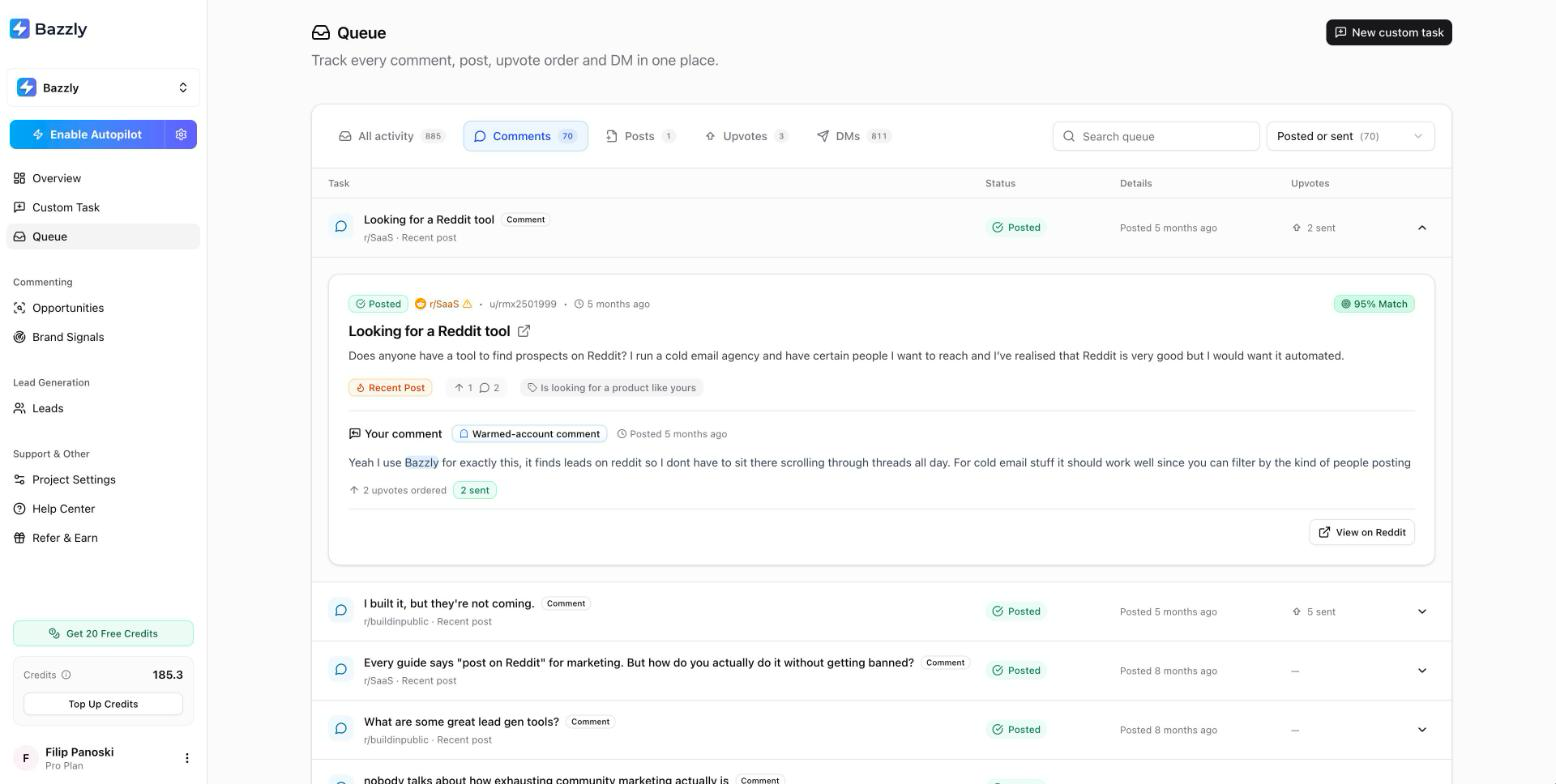
Filter by type and status, then click a row to open its card.
Queued
The timing line tells you what happens next:
- Posting when you launch chrome extension: an own-account comment. Nothing posts until you open the Bazzly extension in your browser and start a run. The banner at the top of the Queue shows whether the extension is installed and has a Post N replies button when it is.
- Posting in about 3 hours (or Posting automatically soon): a warmed-account comment scheduled on the posting network. The slot is chosen to look natural; you do not need to do anything.
Every queued comment shows Edit Comment and Cancel Comment. An own-account comment can be edited or cancelled (with a five-second Undo) until it posts. For eligible warmed-account comments, both buttons stay enabled until posting preparation starts, including while waiting for a slot. An edited warmed-account comment goes through the same checks as a new one (no links, English only, not a near-copy of another warmed-account comment), and the new text is what gets posted. Clicking Cancel Comment opens a confirmation explaining that the comment will not go live and that all comment and pending upvote credits will be refunded. Once preparation starts, or when cancellation is unavailable for that comment, both buttons are disabled. Hover over them to see why, for example “This comment is being prepared for posting and can no longer be cancelled.”. If a warmed-account comment cannot be posted within five days it is cancelled automatically and refunded.
Posted or sent
Posted comments link straight to the live comment on Reddit. Their cards show when the comment went live, a View on Reddit button, and the state of any upvote order:
- Pending: upvotes start once the comment is posted.
- In progress: upvotes are being sent gradually. For top-ranked (Google) threads they start 10 days after posting to lower risk.
- N sent, N failed (with credits refunded for the failed ones), Failed, Cancelled, Refunded.
An own-account comment posted without upvotes shows Order upvotes, so you can boost it after the fact.
Bazzly keeps re-checking every posted comment: hourly for the first two days, then less often for up to six months. If it disappears, the comment moves to Removed.
Removed
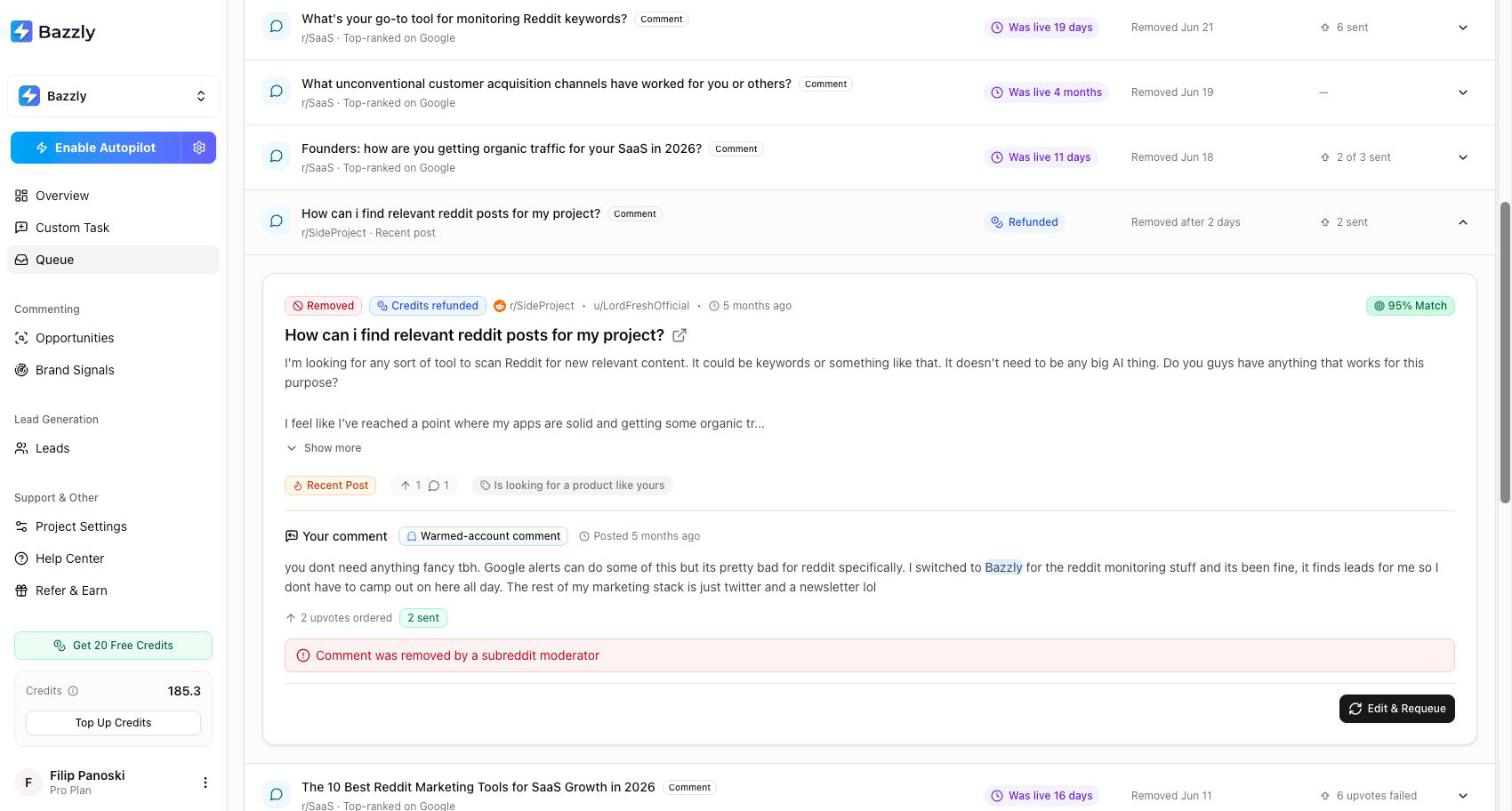
Removed within 48 hours: the row reads Refunded and the comment credits are already back in your balance.
A removed comment did go live, then was taken down. The card shows how long it stayed up and, where known, why. Two rules govern credits:
- Comment credits are refunded automatically when the removal is detected within 48 hours of posting. The row shows Refunded, the card gets a Credits refunded chip, and the banner above the list says the same.
- The exception is strict-on-promo subreddits: if you chose to post there anyway, removed comments are not refunded. The composer warns you about this before you queue.
Upvote credits for upvotes that were never delivered are always refunded, regardless of timing.
Edit & Requeue opens the editor. Requeuing a warmed-account comment costs 10 credits again, and the posting network may ask you to change the text first (edit the message first for extra safety), because reposting identical text after a removal is a strong spam signal. Change the angle, drop anything promotional, and try again, or pick a different thread.
Cancelled or failed
Comments you cancel appear here too. Cancelled comments never reached Reddit: the thread was locked or deleted before posting, the account could not post there, or the five-day window ran out. Credits are refunded automatically and Edit & Requeue is available if the thread is still open.
Where Autopilot comments appear
Comments posted by Autopilot show up in the Queue like any other warmed-account comment, with the exact text that was posted. They also appear in the Activity Log tab of the Autopilot page (click Autopilot active at the top of the sidebar), grouped by day with a credits breakdown per comment.
Quick reference
- Own-account comments: free, posted when you launch the extension, editable and cancellable while queued.
- Warmed-account comments: 10 credits, posted automatically, not editable after queueing, refunded if removed within 48 hours (except in strict subreddits) or never posted.
- Upvotes: 0.2 credits each, delivered gradually, undelivered ones refunded.
Frequently asked questions
- How long does a warmed-account comment take to post?
- Usually within a few hours. Each comment is scheduled into a natural-looking slot on the posting network, and the Queue shows the expected time once the slot is booked. Comments on search-ranking threads and on posts at least a week old, in a community that is new to the posting account, usually take three to five days, because the account takes part in that community first so your comment is more likely to stay up. If a comment cannot be posted it is cancelled and refunded automatically.
- Can I cancel a warmed-account comment after queueing it?
- Yes, when its Cancel Comment button is enabled. Cancellation is available for eligible warmed-account comments until posting preparation starts. You will be asked to confirm before the comment is cancelled and all comment and pending upvote credits are refunded. Some comments cannot be cancelled, and a comment that has started preparing to post cannot be stopped. Own-account comments can be edited or cancelled before you run the extension.
- My comment was removed. Do I get my credits back?
- Yes, if the removal is detected within 48 hours of posting, which covers almost all moderator removals. The only exception is a strict-on-promo subreddit where you chose to post anyway. Undelivered upvotes are refunded in every case.
- Why does Requeue ask me to edit the comment first?
- Reposting identical text after a removal looks like spam to Reddit and to moderators. The posting network rejects unchanged resubmissions for the safety of the account, so change the wording and tone before requeuing. The same applies to a cancelled comment we could not confirm went live: it may still appear on Reddit later, and the same text twice in one thread looks like spam.
Was this article helpful, or still stuck?
Contact support