On this page
A verified email proves one thing to Reddit: you can receive a six-digit code. It says nothing about whether the communities you want to join will let you post, comment, or stay.
That's the gap most signup walkthroughs skip. They take you through the form, celebrate the confirmation screen, and leave you with an account that looks finished but behaves like a stranger in every subreddit you visit. Reddit account creation is quick. The part that decides whether the account is useful happens after the password field.
So start from the end. If you want a personal login you'll keep for years, the priority is recovery, meaning the route that still works after you've changed phones and forgotten which password you used. If the account exists to represent a product or a project, the priority is trust: a name you can live with, and a posting history that moderators read as a person rather than a billboard. Those are different goals, and they push you toward different choices on the very first screen.
Signup Methods Compared at a Glance
Which button should you press?
Reddit puts four doors in front of you, and they don't lead to the same place. Email, phone number, Google and Apple each produce a working account, but they differ in what they ask for, how you get back in later, and what fails without warning.
The shape of the form comes from Reddit's history. Its registration documentation describes an early flow built for pseudonymous joining: choose a username, set a password of at least six characters, clear a CAPTCHA-style check, and the account existed immediately, signed in and able to vote, with no real name or email required. Email was optional even then, and the one thing it bought you was password recovery. Current support guidance adds the routes you see today, including email verification, Google or Apple sign-in, and phone-number signup in eligible countries, so low friction and stronger identity now sit side by side.
Reddit signup methods and what each requires
| Method | What You Need | Password and Recovery | Watch Out For |
|---|---|---|---|
| An email address and the six-digit code Reddit sends | You set a password, and the email is your recovery path | Verify the email immediately, because recovery depends on it | |
| Phone number | A phone number in an eligible country | The account may start with no password and no recovery email | Add and verify an email before you can set a password |
| An existing Google account | Google single sign-on handles the login | Can create a separate Reddit account if the identity isn't already linked | |
| Apple | An existing Apple ID | Apple single sign-on handles the login | Same linking risk as Google, so test the login before you rely on it |
Read the rows against your own situation. Email is the default for an account you intend to keep, because the code takes seconds and the verified address becomes the way back in. Phone signup can leave you without a password and without a recovery email until you attach one, which is a strange state for an account you plan to use daily. Google and Apple are the fastest options and the ones most likely to surprise you, since a single sign-on identity that isn't already linked can open a second Reddit account instead of the one you meant to use.
Choose the route you can still log into years from now, not the fastest one on screen.
How to Create Your Reddit Account Step by Step
Creating a Reddit account takes only a few minutes, but the account you create becomes the identity every later action depends on. The form proves three things: you can receive verification, you can return through the same login, and you have a stable name attached to your history. Communities will still judge the account by how it behaves, so treat setup as the foundation of trust rather than trust itself.
Work through it on a desktop browser the first time, because every field and every prompt fits on one screen.
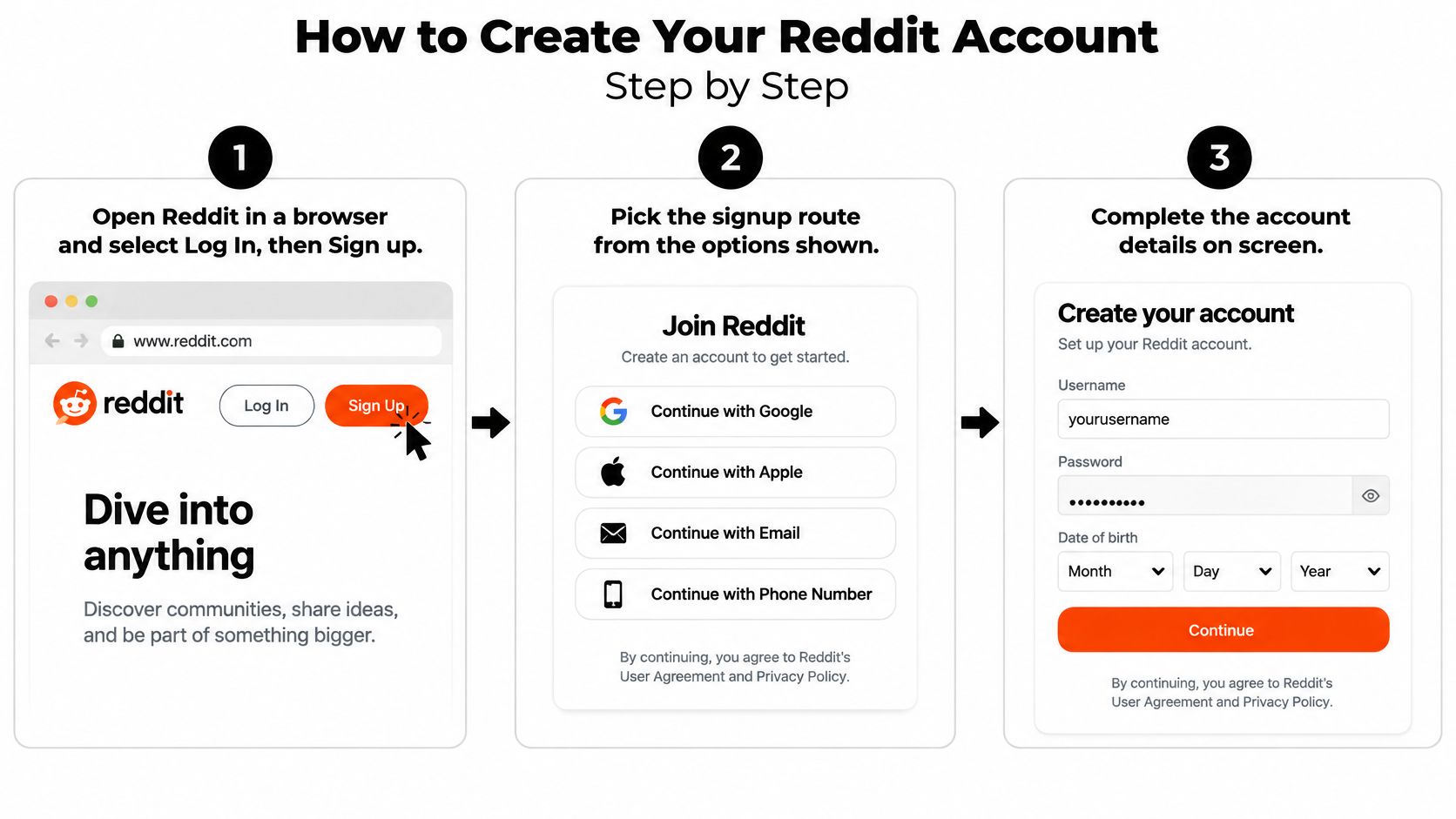
-
Open Reddit and select Log In, then Sign up. On a phone, the verification step can slide past while you're tapping through, and you end up back at the login screen wondering what happened.
-
Use the signup route you chose, and use it everywhere. Signing in with Google on your laptop and with an email on your phone is how people end up with two accounts and no idea which one holds their history.
-
Complete the verification Reddit asks for. For the email route, Reddit's signup help page describes a standard flow in which Reddit sends a six-digit code to paste into the form. The usual slip is a typo in the address, which sends the code nowhere and leaves you refreshing an inbox that was never going to receive it.
-
Choose a username and read it twice. Reddit locks it at creation, so a typo is permanent. Say the name out loud before you confirm, then check whether it still sounds right beside the topics you expect to discuss.
-
Create your login credentials. Set a password, or accept a passkey if Reddit offers one. Passkeys are optional, so declining doesn't break anything. Accepting one on a shared or borrowed device can leave you with a login that is hard to move to your own hardware later.
-
Finish onboarding and prove the login works. Pick a few topics so your home feed isn't empty, then sign in from a private browser window. A private window removes the comfort of an existing session, so it tests whether the account name and credentials really work. If the login fails there, it will fail when you need it most.
One rule sits above the mechanics: Reddit requires account holders to meet the minimum age in its user agreement, and that minimum can be higher where local law sets a higher age.
Before you post anything, record the exact username somewhere you'll find it, confirm the recovery email is verified, and store your backup authentication details. Those small checks matter because an account's history only becomes valuable if you can keep returning to it.
If you'd rather watch the screens first, this walkthrough covers the same flow at a slower pace.
A finished account looks unremarkable, and that's the point. You can log in from a clean browser, you know the exact name, and someone you trust could recover it if you couldn't.
Choose a Username That Lasts
A finished signup proves two things only: the name was free, and the account can log in. Communities read a different set of signals. Reddit usernames are globally unique, fixed at creation including capitalization, and never reusable once released, so the choice is less like picking a label and more like choosing the face of every future comment.
The hard part is that the field rewards caution before you have context. A name that feels witty in the signup box can read as a campaign account inside a strict subreddit, while a plain name gives your early comments room to be judged on their words.
Three habits keep you out of trouble.
- Avoid your full real name plus your city. It is the common pattern for people who intend to be professional and later want to speak plainly about a former employer or a competitor.
- Skip random digit strings. A handle followed by four digits reads disposable, and moderators are slower to trust accounts that look temporary.
- Check spelling character by character. Capitalization is fixed too, so one wrong letter becomes part of the public record.
Then decide whether the name will ever sit beside a product. If you plan to mention something you are building, a handle that sounds like a brand makes every comment look promotional before anyone reads it. A neutral name you can use for years does more work than a clever one you outgrow in a quarter. If you need candidates, a Reddit username generator can supply options to react to, while the judgment about which one to keep stays with you.
Ask three questions before you confirm. Would I still like this name in five years? Would a moderator read it as a person rather than a campaign? Can I say it without spelling it out? Two yeses are not enough. You want all three.
Secure the Account Before You Post
A new Reddit account usually fails through recovery, not through signup. Creation proves you can register an identity. Security proves you can keep that identity long enough for communities to recognize it.
Attach an email address as soon as the account exists, and verify it the same day. That address is the route back when a password is forgotten, a session expires, or a phone is replaced. Treat it as part of the account, not an optional extra. Then use a password manager to generate a long random password that exists nowhere else. Reusing the password from your email account turns one leak into two compromised logins, because whoever ends up with both can reset everything else you own.
Phone signup deserves the same scrutiny. Teams creating accounts at volume sometimes look at disposable numbers for Reddit signups, but the test that matters is simple: if you cannot control the number next year, you cannot use it to recover the account next year. An account built on rented access stays borrowed, even if the profile looks finished.
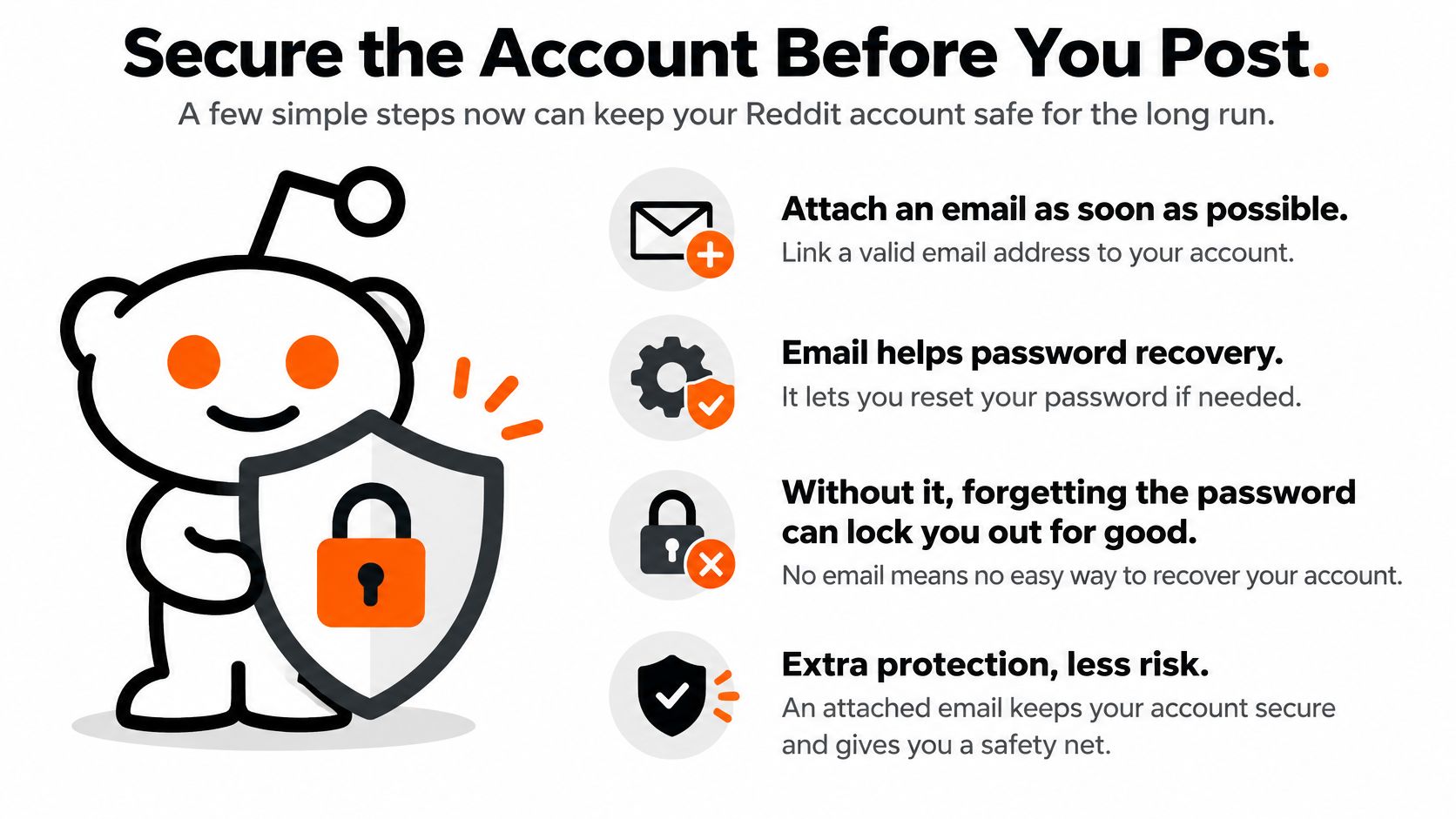
The email is the item every security checklist starts with, and the one people skip because it feels like homework.
Passkeys, where available, remove the password from login and tie access to a device you hold. That blunts much phishing because there is nothing to type into a fake page. Use one if you have a phone or laptop you control. Keep the reset pattern straight either way: a message that urges you to log in through a link to keep the account active is an attempt, and a genuine reset never asks you to paste a password into a reply or chat.
If your team legitimately administers more than one account, give each its own password and recovery address, and write down which person owns which login. Without that record, someone eventually posts from the wrong identity or locks the right person out.
Finish with a short checklist.
- Unique password, generated and stored in a manager.
- Recovery email verified and reachable today.
- Passkey or second step enabled if your device supports it.
- Ownership written down, including who can recover the account.
- A monthly login test from a private window, so a lockout shows up on your schedule.
Why a New Account Gets Restricted
Someone posts a thoughtful comment on a two-day-old account and watches it disappear. They assume the signup failed. It didn't.
Account creation proves identity. Posting privileges are granted separately, community by community, and new users who treat them as the same thing get lost fast. Reddit's transparency report to the California Attorney General.pdf/Reddit,%20Inc.%20-%20AB%20587%20Terms%20of%20Service%20Report%20(H2%202025).pdf) documents ongoing administrator action against accounts, and the enforcement framework it describes runs from warnings through temporary suspensions and permanent bans to restrictions on specific privileges. Which response applies depends on the violation type, its severity, and your prior history on the platform.
The pattern to watch for has nothing to do with how you signed up. Accounts that run multiple profiles, post promotional content on day one, or ignore community norms are the ones most likely to collect restrictions, even when identity verification has succeeded. Signup is the start of trust-building, not the finish line.
| Symptom | Likely Cause | What to Do |
|---|---|---|
| Post removed right after publishing | Subreddit rule or automated moderation filter | Read the subreddit rules and check the removal reason before reposting |
| Cannot post in some communities | Subreddit requires a minimum account age or karma, or the account is new | Participate in other communities and return to the restricted one later |
| Post hidden or filtered | Spam filter reacting to repeated links or identical text | Stop repeating the same link or text and post normally |
| Warning or temporary suspension notice | Sitewide enforcement for a rule violation | Read the notice, follow the guidance, and avoid creating a replacement account |
| Login works but posting is limited | Restricted privileges after enforcement or spam signals | Review the notice and your account status before posting again |
Two different systems can stop you, and they need different responses. A subreddit-specific block follows that community's own rules and usually resolves with time and ordinary participation elsewhere. Sitewide enforcement arrives with an official notice, and the notice is your instruction sheet, not an invitation to argue. Read it before you post anything else.
The move that makes it worse: creating a second account to get around a restriction. That turns a temporary problem into a pattern.
If you're already carrying a flagged account and wondering whether to keep posting with it, our guide to warmed-up accounts and ban safety explains how account history changes what Reddit and moderators will allow.
Build Trust and Choose How to Post
Posting access is granted by communities one at a time, and each one wants evidence before it hands anything over. The evidence is boring: readable comments, a name that doesn't change, and a rate of contribution that looks human.
Read the room before you write in it
Every subreddit writes its own rules, and self-promotion rules swing from no links ever to share freely if you're active. They live in the sidebar and on the rules page, not in the posts, so reading the front page tells you the tone but not the limits. The mistake is assuming that because a post about a similar tool survived last month, yours will.
Three habits do most of the work.
- Answer questions you can answer. One specific detail from your own work beats a paragraph of agreement, and it's the fastest way for regulars to learn your name.
- Keep ordinary participation far ahead of promotion on the same account. If three of your last five comments link to your product, the account reads as an ad account no matter what the rules allow.
- Resist posting the same link or text across subreddits. Repetition is the clearest spam signal you can send, and it invites both filters and moderators.
Then decide how you talk about what you're building. Disclose the interest where the rules allow, in your profile or in the post itself. A participant with a stake in the answer is welcome in most communities. Someone pretending to be a neutral user and getting caught isn't.
Practical rule: if a subreddit's rules would make your post an advertisement, don't post it there. Post where the same words are a contribution.
Three routes for posting, weighed
Manual posting is the default for a personal account. Every action happens under your own identity, nothing sits between you and the community, and it costs the one thing you can't buy back, which is time. For one account used by one person, that cost is manageable and the trust compounds properly.
A helper tool that posts from your own account speeds up the writing and timing without changing whose name appears on the comment. The constraint stays the same: the tool can't grant permission the subreddit hasn't given, so the rules still govern every post.
Warmed-up accounts keep your own account out of the posting entirely. Someone with an aged, credible history posts the reply instead, which matters when your personal or company account would draw attention to itself for the wrong reason. The reply still has to fit the community it lands in, and some subreddits won't accept it at all.
That third route is what we built at Bazzly. You can post replies from your own account through our free Chrome extension, where the usual rules still apply, including not spamming and not ignoring subreddit rules, and those comments post when you run the extension at up to 3 per rolling 24 hours and 1 per subreddit. Or we post through warmed-up accounts with established history instead, so your own account is never the one on the line. If the buttons themselves are still unclear, our walkthrough of how do you post on Reddit covers each post type and where it lands.
Pick your route today, write down the account owner and the recovery email, and spend the first two weeks only reading and commenting. Promotion gets a hearing after people recognize the name, not before.
Bazzly watches the subreddits you choose around the clock, scores every new post for buying intent and fit, and drafts a reply for the threads worth answering, so your first weeks of participation point somewhere instead of scattering. You keep the judgment calls and post from your own account through the free Chrome extension, or let us post from aged, warmed-up accounts when your own name shouldn't be the one in the thread. Visit Bazzly and start the 7-day free trial to see which conversations in your niche are live this week.
Written by Bazzly Team
Bazzly builds software that finds buyer conversations on Reddit and posts helpful replies in them (227,592 posts flagged for customers since June 2, 2025). The Bazzly numbers we quote come from our own data, published with the method in our research studies. About us

