Reply Autopilot: going fully hands-off
Configure pace, relevance threshold, target, smart upvotes, and auto top-up so Bazzly runs on its own.
Autopilot turns Bazzly into a hands-off channel: it finds relevant Reddit posts, writes the comment, posts it through a warmed-up account and adds upvotes, without you approving anything. You decide how fast it runs, how relevant a post has to be, which threads it draws from, and how it should write. This article covers every setting and what happens when Autopilot pauses itself.
Three things to know up front:
- Autopilot comments only. It never sends DMs. DMs always go through the DM Queue and the browser extension from your own account.
- Autopilot posts only through warmed-up accounts. Your personal Reddit account is never used.
- There is no approval step. If you want to review each comment first, use the Opportunities page instead; Autopilot is for when you trust the settings.
Turning it on
Open Autopilot in the sidebar and flip the switch, or click Enable Autopilot at the top of the sidebar to turn it on in one step. On a trial or canceled plan the button opens the page and you flip the switch yourself.
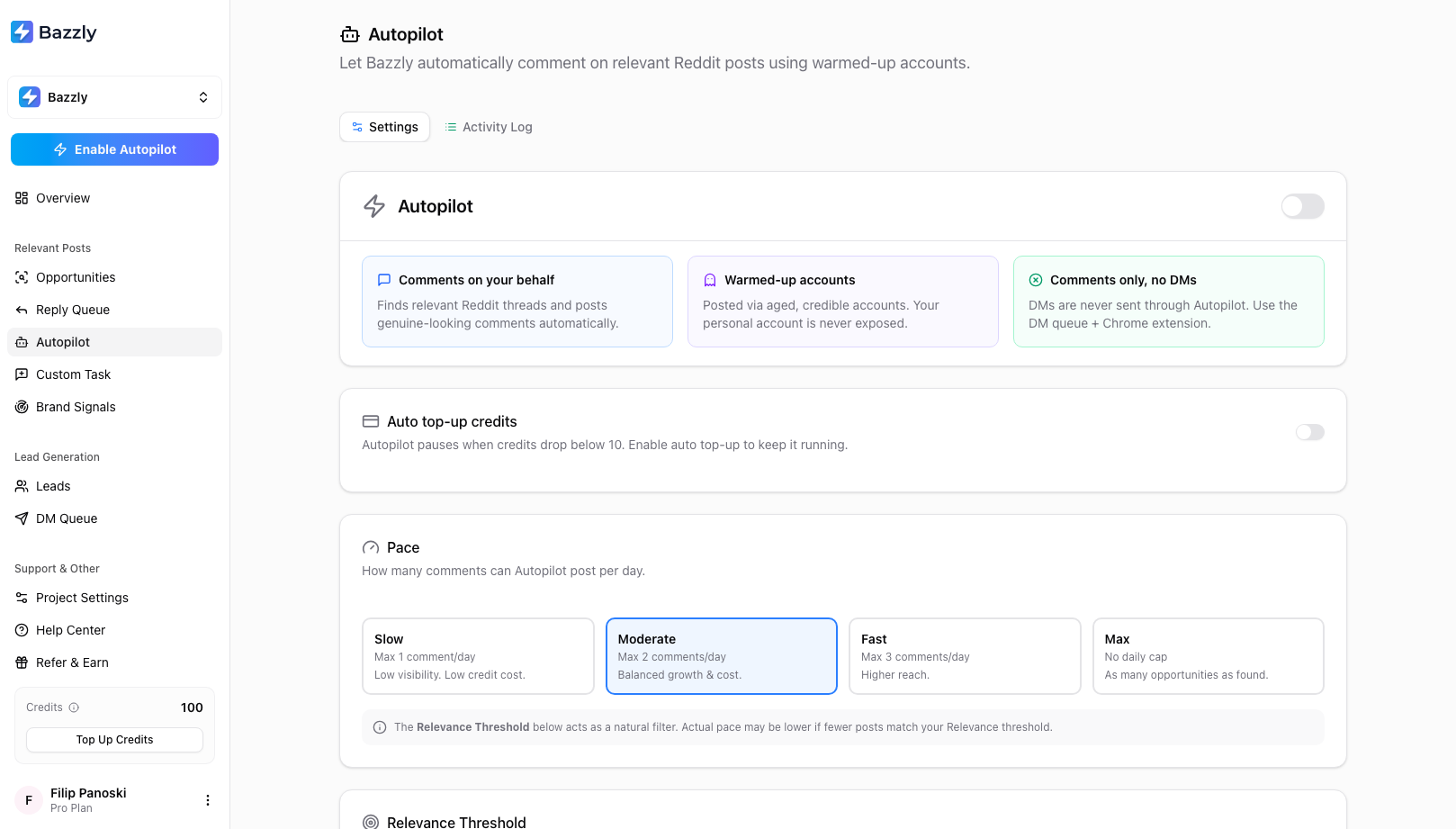
The master switch, auto top-up, and pace. Autopilot needs an active plan; trial accounts are asked to activate first.
Once running, the header shows the last comment posted or queued, plus three counters for the month: comments, upvotes and threads skipped because they fell below your threshold. AI drafts written by Autopilot are free; you pay only for the comment (10 credits) and any upvotes (0.2 each).
Pace: how many comments per day
| Pace | Comments per day |
|---|---|
| Slow | up to 1 |
| Moderate (default) | up to 2 |
| Fast | up to 3 |
| Max | no fixed daily cap, as many qualifying posts as Autopilot finds (Bazzly still applies an internal safety ceiling so a single project cannot post an unusual volume in one day) |
Pace is a ceiling, not a target. If only one post clears your relevance threshold today, Autopilot posts one comment. Moderate is the right starting point: two well-placed comments a day compound quickly and keep the account behaviour natural.
A comment you cancel in the Reply Queue before it posts does not use up that day's pace. Autopilot picks a different thread to replace it on its next hourly run, and it will not choose the cancelled thread again.
Relevance Threshold: how good a post has to be
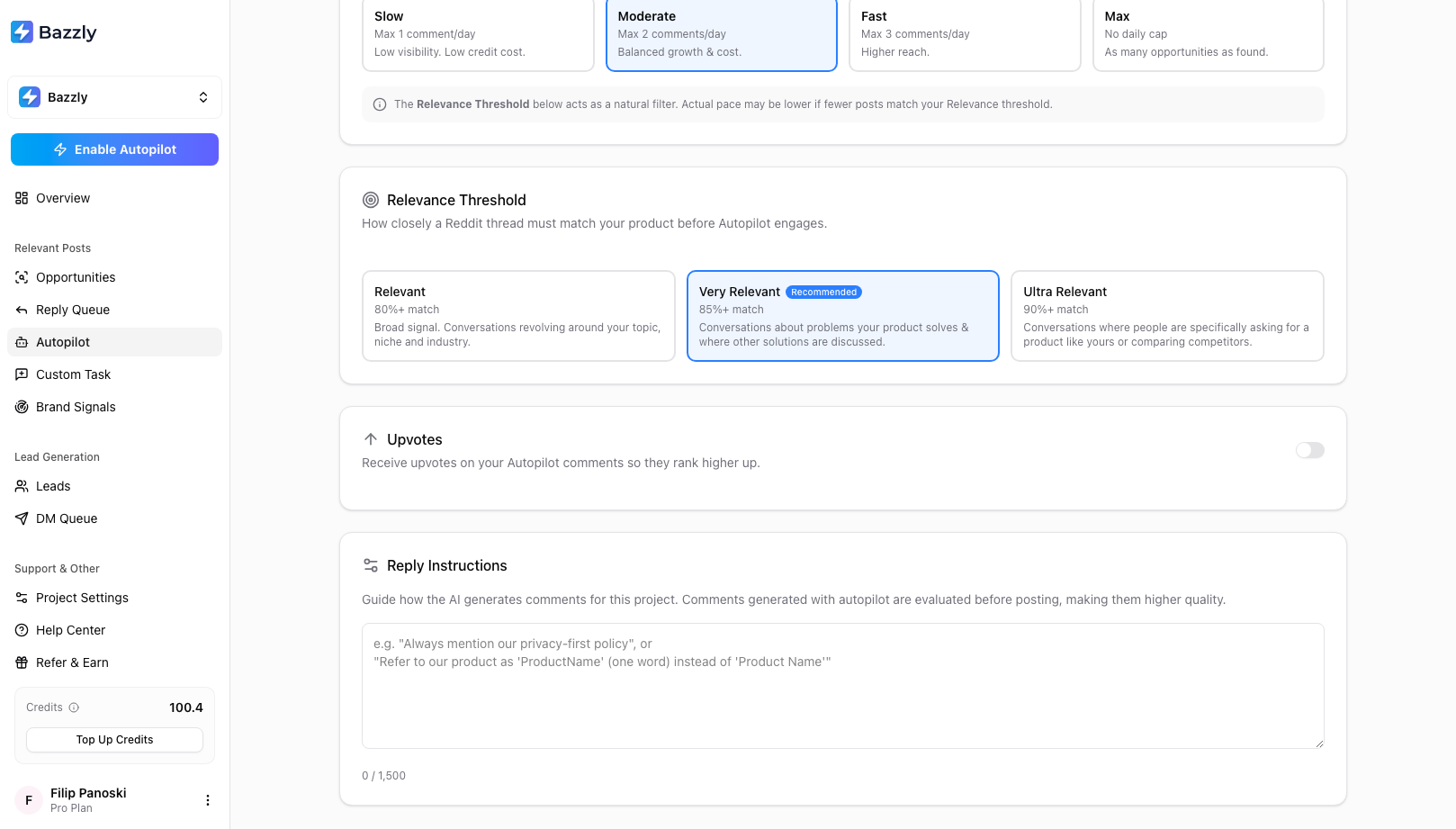
Very Relevant is the recommended default. Ultra Relevant waits for explicit buying signals.
- Relevant (80%+): broad. Conversations around your topic, niche and industry.
- Very Relevant (85%+, recommended): conversations about problems your product solves and threads where other solutions are being discussed.
- Ultra Relevant (90%+): only threads where someone is explicitly asking for a product like yours, comparing tools, or unhappy with a competitor. Fewer comments, highest intent.
At every level Autopilot only engages posts classified as asking for a tool, describing a problem you solve, comparing products, or being unhappy with a competitor; at Ultra Relevant it drops the "describes a problem" category entirely. It also ignores posts older than seven days, so it never revives dead threads.
Target: which threads Autopilot replies in
Autopilot draws from two pools. Recent posts are new threads in your watched subreddits and keyword searches, up to seven days old. Top-ranked threads are older Reddit threads that rank on Google for your project's search queries. Target decides which pool it uses.
- All posts (default): both pools. The widest choice, balancing long-term search traffic with immediate visibility. When a recent post and a top-ranked thread both qualify, Autopilot leans toward the top-ranked thread.
- Recent posts only: fresh conversations while readers are still arriving. Lowest removal rate and the most immediate traffic. Narrowing to one pool means some days may pass with no comment; add subreddits in Project Settings for more volume.
- Top-ranked only: older threads that keep sending search traffic for months. Highest removal rate, and new ranking threads appear less often than fresh posts, so expect a slower pace. Add search queries in Project Settings for more volume.
Target changes which posts are considered, not how good they must be. The Relevance Threshold applies to both pools.
Upvotes
Switch Upvotes on to boost every Autopilot comment:
- Rank #1 (default): Autopilot checks the thread's top comment and adds just enough upvotes to pass it. Once your comment is first, no more are sent.
- Custom: a fixed number per comment (default 5).
Upvotes cost 0.2 credits each, are delivered gradually, and are limited to 10 per comment for safety.
Reply Instructions
The Reply Instructions box (up to 1,500 characters) guides how the AI writes for this project. It saves automatically as you type. Comments written on Autopilot are evaluated before posting, so instructions here have a strong effect on quality. Be concrete: what to always mention, what to never claim, how to refer to the product. Keep URLs out: if three drafts in a row contain a link, Autopilot pauses (see below).
Auto top-up credits
Autopilot needs at least 10 credits to post a comment and pauses below that. Switch on Auto top-up credits to keep it running:
- When credits drop below a threshold (default 20, between 10 and 90)
- Automatically add 25, 50, 100 or 250 credits, charged to the card on file at 1 credit = $1
- Monthly limit (optional, none by default): the most auto top-ups can charge in a calendar month, $25 to $10,000. The card footer shows what has been used so far; it resets on the 1st (UTC). Manual top-ups never count toward it. A limit is always at least one top-up: pick a bigger top-up size and the limit is raised to four top-ups' worth; type a limit below the top-up size and it snaps up to that size. A message tells you the new value either way, and you can change it right after.
- Email receipts (off by default): a receipt email for every auto top-up. Leave it off and Bazzly runs quietly; you are still emailed if a monthly limit stops Autopilot. Every charge also appears in the credit log and on your card statement.
The card footer shows the payment method that will be charged. Without one, the card shows a single Add a payment method line instead of the settings, with a button to the billing tab of Account Settings. Auto top-up only fires while Autopilot is running; it is not a general account setting.
When Autopilot pauses
Autopilot protects your credits and the account it posts from. A banner at the top of the page explains any pause, and you get an email:
- Insufficient credits. Below 10 credits. Add credits or enable auto top-up; Autopilot resumes on its own once credits are available.
- Recent replies contained links. Three drafts in a row contained a URL or domain. Remove link mentions from your reply instructions, then turn Autopilot off and on again.
- Auto top-up failed. The charge did not go through. Update the payment method or top up manually.
- Monthly limit reached. Credits fell below 10 and the next auto top-up would exceed your monthly limit. Raise or remove the limit, or top up manually, to resume now; otherwise Autopilot resumes on its own on the 1st.
You also receive a weekly email on Mondays summarising what Autopilot posted for each project, and, if you turned receipts on, a note whenever an auto top-up succeeds.
The Activity Log
The Activity Log tab lists every Autopilot comment grouped by day, with a status badge (Posted, Removed, Failed, Pending), the credits it cost broken down by comment and upvotes, and View on Reddit. Quiet days are collapsed with a reminder that Autopilot only comments when it finds strong, relevant posts. Removed comments can be edited and requeued from here, at the normal 10-credit cost.
Turning it off
Flip the master switch. Comments already handed to the posting network still go out; nothing new is queued. Your settings are kept for next time.
Frequently asked questions
- Can I approve Autopilot comments before they are posted?
- No. Autopilot is the fully hands-off mode and posts without review. If you want to see each comment first, work from the Opportunities page: Bazzly drafts, you edit and queue. Many people run both, using Autopilot with a high threshold and handling borderline posts manually.
- How much does Autopilot cost per day?
- Each comment costs 10 credits plus 0.2 credits per upvote; AI drafts on Autopilot are free. On Moderate pace with Rank #1 upvotes, a typical day is two comments at roughly 11 credits each. Autopilot pauses automatically below 10 credits.
- Why did Autopilot post nothing today?
- Nothing cleared your relevance threshold, every qualifying post was older than seven days, or your Target is set to a single pool that had nothing new. Check the Activity Log for skipped-thread counts, and consider moving from Ultra Relevant to Very Relevant or adding subreddits in Project Settings.
- Does Autopilot use my Reddit account?
- Never. Autopilot posts only through warmed-up accounts operated by Bazzly. Your own account is only ever used by the browser extension, and only when you start a run yourself.
Was this article helpful, or still stuck?
Contact support