Installing and using the browser extension
Install the Bazzly extension on Chrome to send DMs and post from your own account.
The Bazzly browser extension is the bridge between the dashboard and your own Reddit account. It sends queued DMs and posts queued own-account comments from inside your browser, using the Reddit session you are already logged into, so everything happens from your device and your IP address exactly as if you did it by hand. It never sees or stores your Reddit password.
You need the extension for two things: sending DMs (there is no other way to send them) and posting comments from your own account rather than a warmed-up one. If you only ever post through warmed-up accounts and never DM, you can skip it.
Install
- Open the Bazzly extension on the Chrome Web Store and click Add to Chrome. It works in Chromium-based browsers: Chrome, Edge, Brave and Arc.
- Pin it to the toolbar (puzzle-piece icon, then the pin next to Bazzly) so the popup is one click away.
- Make sure you are logged into Reddit in the same browser.
The dashboard notices the extension within a couple of seconds. On the Reply Queue and DM Queue pages the banner switches from Extension not installed to Extension Connected.
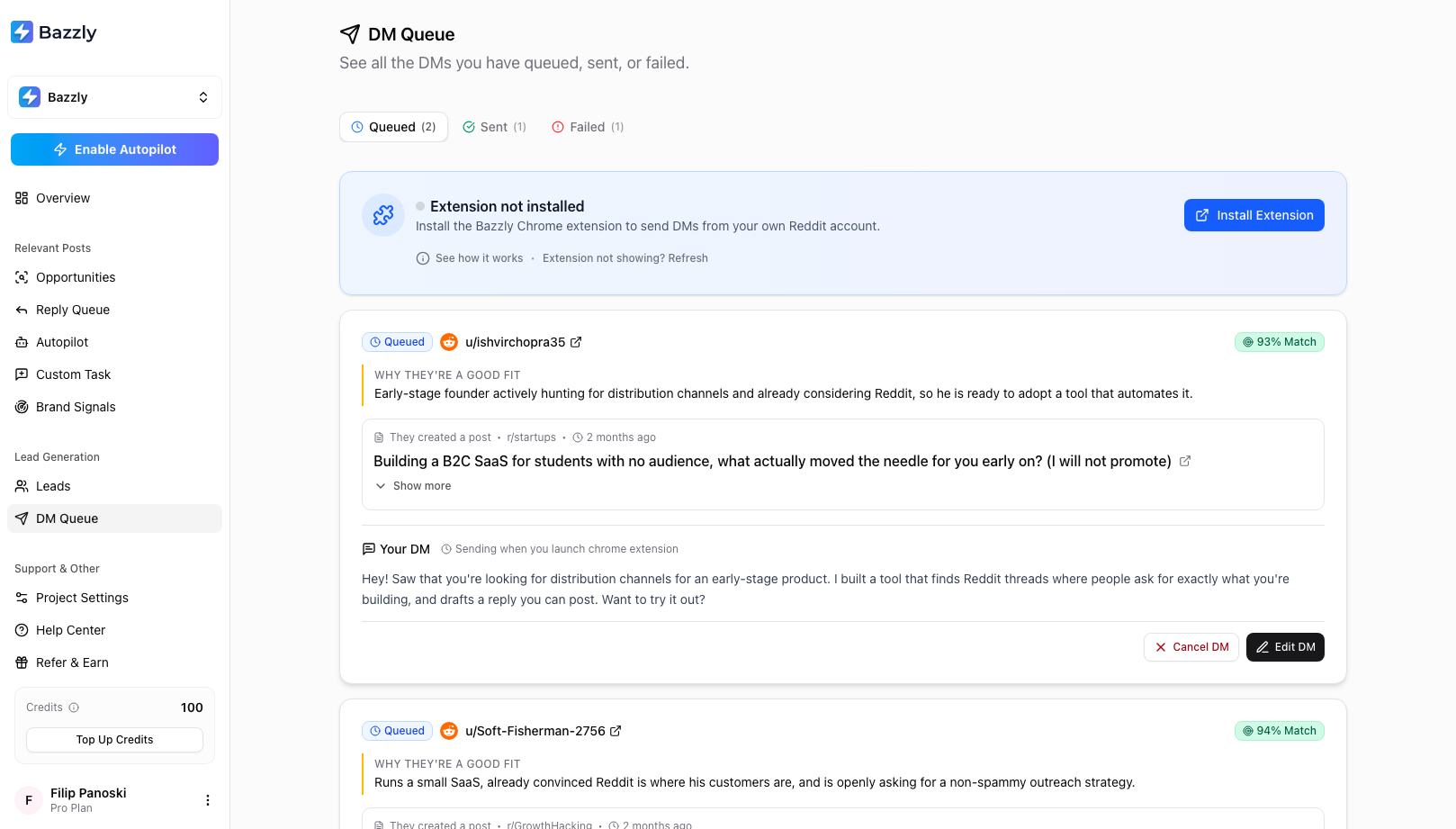
Before installing, the queue pages show this banner. After installing, it turns green and offers to send your queue.
If the banner does not update, click Extension not showing? Refresh.
Sign in
There is no separate login. The extension picks up your Bazzly session from bazzly.ai: sign in to the dashboard in the same browser and the popup follows. If you open the popup and see Offline with Sign in at Bazzly.ai, click it, sign in, and reopen the popup.
First run: an honest note about risk
The first time you open the popup after signing in, it shows Before you start. It explains that the extension acts through your own account, so Reddit's usual rules apply to you, and gives three pieces of advice worth following: use an aged account, mix in genuinely helpful comments, and ramp up DMs slowly (3 to 5 a day at first). Click I understand, let's go to continue.
Sending your queue
Open the popup. The Queued card shows how many DMs and comments are waiting. Click Start sending. If both DMs and comments are queued, the button becomes a menu: Send all, Comments only or DMs only.
The extension needs a Reddit tab to work in. If the active tab is not on reddit.com it opens one. That tab becomes the worker tab: keep it open for the whole run (closing it pauses the run) and, if things seem stuck, bring it to the front, because browsers throttle background tabs.
During the run the popup shows X of Y sent, a per-type breakdown of sent, failed and skipped, and the current step (Opening user profile..., Writing message..., Verifying message delivery...). Between items it waits a randomised 20 to 32 seconds (30 to 60 seconds before a reply) and counts down. You can Pause at any time, then Resume or Stop. You can also close the popup; the run continues in the background and the popup shows live progress when you reopen it.
Each item ends as sent, failed (with the reason written to the queue card, and a Requeue button there) or skipped (an existing conversation with that user, a deleted author, a removed post, or a suspended account). After three consecutive failures the run pauses with Check your Reddit session is active; fix the session, then Retry.
Also useful: on the dashboard, the Send N DMs and Post N replies buttons in the queue banners open Reddit and launch the popup for you.
Comment limits
To keep your account safe, the extension posts at most 3 comments in any 24 hours, and at most 1 per subreddit in that window. This is a fixed limit, not a setting: bursts of promotional comments across subreddits are what get personal accounts suspended.
Replies over the limit stay in the queue until you run the extension again. The popup shows Comments today (how many of the 3 are used), and when you click Start sending it tells you how many of your queued replies can go out today. Queue three replies in r/SaaS and you can post one today, the next tomorrow and the last the day after. DMs are not affected.
The account check
Before the first item of each run, the extension reads your own Reddit profile (age and total karma). If the account is less than 30 days old or has under 150 karma, you see Account looks low-activity with the two numbers and a plain warning: Reddit is strict with new or low-karma accounts, and warming yours up first sharply lowers the chance of a ban.
- Don't send yet (recommended) cancels the run. Read the 30-day warm-up playbook and come back.
- Continue anyway proceeds and remembers your choice for that username, so you are not warned again.
The check fails open: if Reddit cannot be reached it lets you continue. It cannot detect a suspended account; if sends keep failing, check your account status on Reddit directly.
Troubleshooting
- Reload the Reddit tab and reopen the popup.
- Check you are logged into Reddit and into bazzly.ai in this browser.
- Turn the extension off and on again in your browser's extensions page.
- Bring the Reddit worker tab to the front and leave it there during the run.
- Still stuck? Email support@bazzly.ai with what the popup showed and we will sort it out.
What the extension does not do
It does not run on a schedule, does not send anything unless you start a run, does not touch Autopilot (which uses warmed-up accounts only), and does not read your password. Its only permissions are for bazzly.ai and reddit.com.
Frequently asked questions
- Which browsers does the extension support?
- Any Chromium-based browser that installs from the Chrome Web Store: Chrome, Edge, Brave and Arc. Safari and Firefox are not supported.
- Do I have to keep the popup open while it sends?
- No. The run continues in the background and the popup shows live progress when you reopen it. Keep the Reddit worker tab open, though: closing it pauses the run, and bringing it to the front helps if the browser throttles it.
- Does the extension have access to my Reddit password?
- No. It works inside the Reddit session already open in your browser and only has permission for bazzly.ai and reddit.com pages. It never reads, stores or transmits your password.
- Can I choose which queued items get sent?
- Yes. Edit or cancel items in the DM Queue and Reply Queue before you run, and in the popup choose Send all, Comments only or DMs only. Everything left in the queue is sent in order.
Was this article helpful, or still stuck?
Contact support