Getting started with Bazzly: from sign-up to your first reply
A five-minute quickstart — create your account, add your product, and get your first reply live on Reddit.
Bazzly finds Reddit conversations where people are looking for a product like yours, drafts a reply that naturally mentions your product, and — if you want — posts it for you through an aged, warmed-up Reddit account so your own account is never at risk. This guide takes you from sign-up to your first live reply.
You'll be up and running in about five minutes. Here's the whole path at a glance:
- Create your account
- Add your product (Bazzly auto-fills the rest)
- Review your keywords and subreddits
- Find your first opportunity
- Post your first reply
- (Optional) Turn on Autopilot and walk away
1. Create your account
Head to the Bazzly homepage and click Get Started for Free, or use Join with Google for the fastest path. You can sign up with Google in one click or with an email and password — no credit card required to start.
Once you're in, you'll land on the welcome screen:
Welcome – Let's get you started. Paste your product URL and we'll auto-fill everything you need to start growing.
2. Add your product
This is the only real input Bazzly needs from you. In the Product URL field, paste the address of the product or site you want to promote (for example, https://yourawesomeproduct.com), then click Auto-fill Product Details.
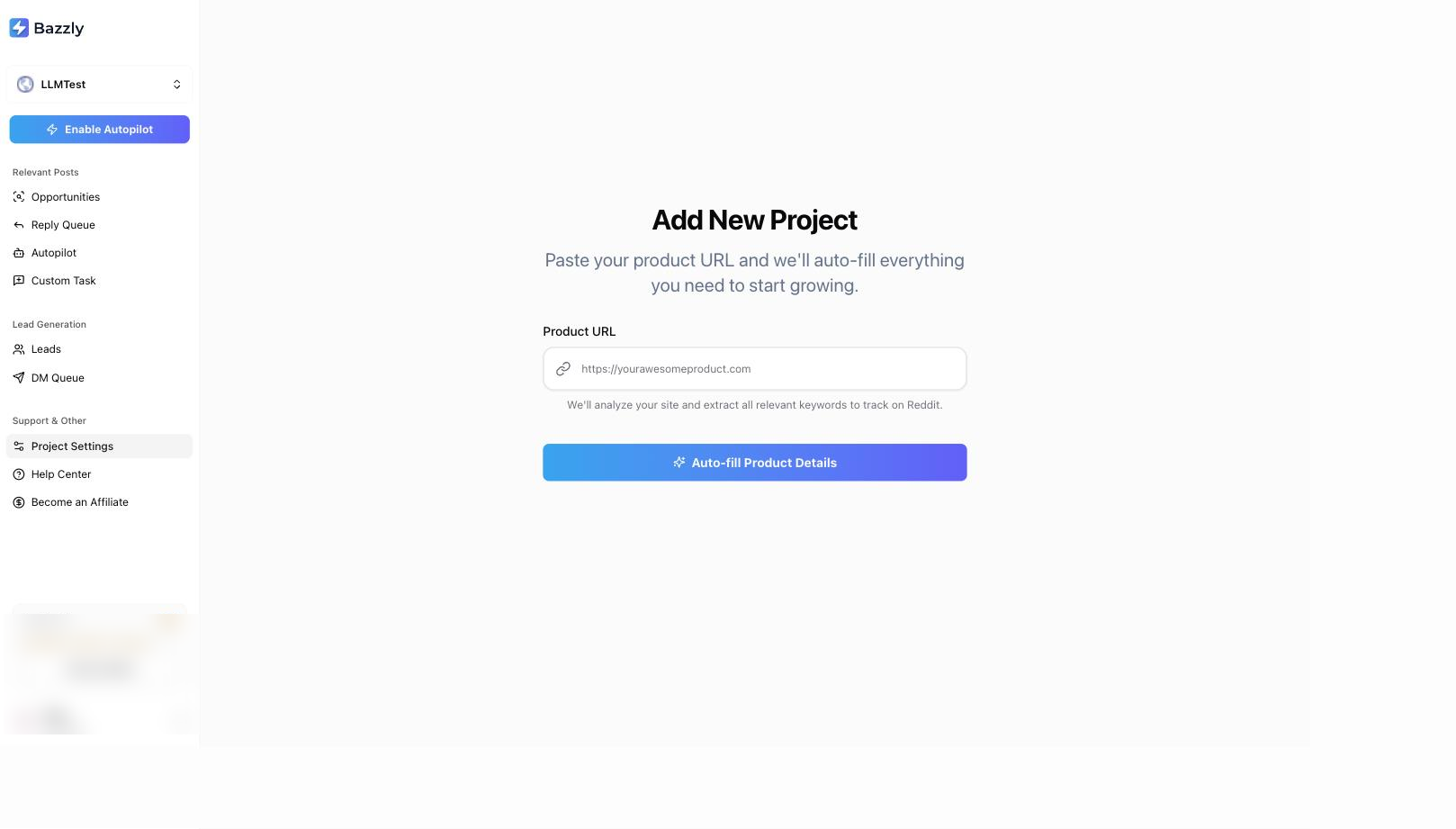
Paste your product URL and Bazzly auto-fills the keywords and subreddits for you.
Bazzly analyzes your site and extracts the relevant keywords to track on Reddit, then pre-fills your project details for you. A project is the container for everything tied to one product: its keywords, the subreddits it watches, the opportunities it surfaces, its reply queue, and its credits. Most people run a single project; you can add more later, each with its own keywords, subreddits and credits (additional projects are billed as extra seats).
Tip: Use the page that best describes what your product does — usually your homepage or a key landing page. The clearer that page is about the problem you solve, the better Bazzly's keyword extraction will be.
3. Review your keywords and subreddits
After auto-fill, take a moment to look over what Bazzly pulled in:
- Keywords — the phrases Bazzly watches for across Reddit. Remove anything off-topic and add words your customers actually use when describing their problem. Sharper keywords mean more relevant matches and fewer wasted credits.
- Subreddits — the communities Bazzly monitors. You can track up to 10 subreddits per project. If you're not sure which communities your audience hangs out in, the free Subreddit Finder tool can help you discover them.
You can always come back and refine these later from Project Settings in the dashboard sidebar — and you should. Tightening keywords after you see your first batch of opportunities is the single biggest lever on match quality.
4. Find your first opportunity
Open Opportunities in the sidebar (under Relevant Posts). This is where Bazzly surfaces the Reddit posts it found for you:
Find relevant Reddit posts for you to plug and promote your product.
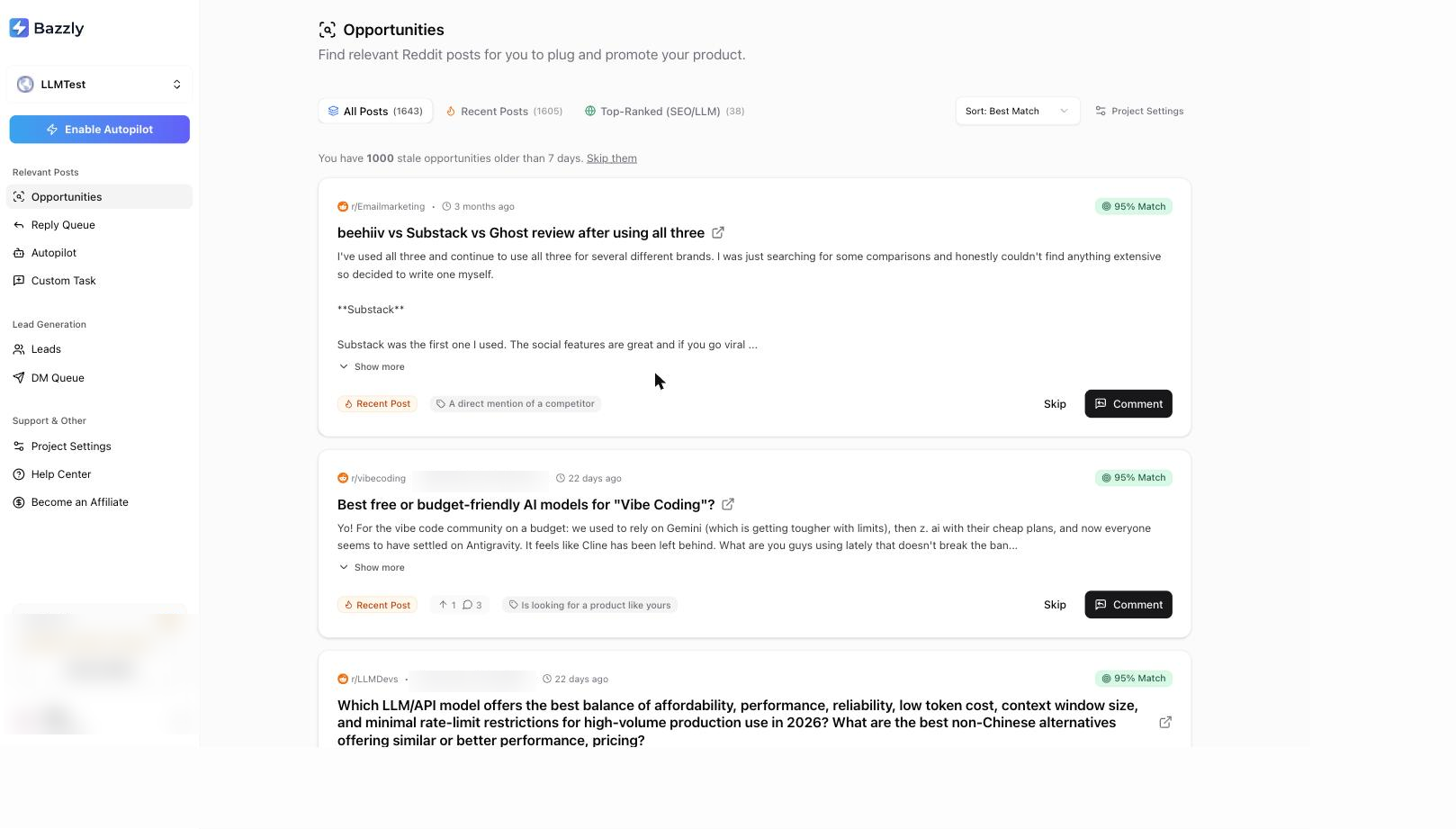
Each opportunity is a real Reddit thread, scored by how closely it matches your product — comment or skip in one click.
Bazzly scans Reddit around the clock, so opportunities keep flowing in as new posts appear. Each opportunity is a real Reddit thread where someone is discussing a problem your product can solve. You can sort by relevance score or recency, and switch between all, recent, and top-ranked posts. Top-ranked posts are threads that already rank on Google — getting your reply onto those puts you in front of people searching for solutions like yours, long after the conversation happens.
Browse the list and open one that looks like a genuine fit. Relevance matters more than volume: a thoughtful reply on the right thread beats ten replies on the wrong ones.
5. Post your first reply
Open an opportunity and Bazzly will draft a reply for you that fits the conversation and works in a natural mention of your product. Read it, edit it to sound like you, and make sure it genuinely helps the person asking — Reddit communities are quick to spot and punish anything that reads like an ad.
When you post a reply, it moves into your Reply Queue, where you can track every comment you've requested:
- Queued — waiting to be posted
- Posted — live on Reddit
- Removed — the post was deleted or a moderator removed the comment
By default, replies are posted through Bazzly's warmed-up accounts — aged Reddit accounts with established reputation. Posting through them instead of your own account means there's no ban risk to you, and because Reddit trusts these accounts more, the comments are less likely to be filtered out. (Prefer to post from your own account? You can do that with the browser extension instead — it acts from your browser and your own IP, just like manual posting.)
That's your first reply live. 🎉
6. (Optional) Turn on Autopilot
If you'd rather not check in every day, open Reply Autopilot in the sidebar:
Let Bazzly automatically comment on relevant Reddit posts using warmed-up accounts.
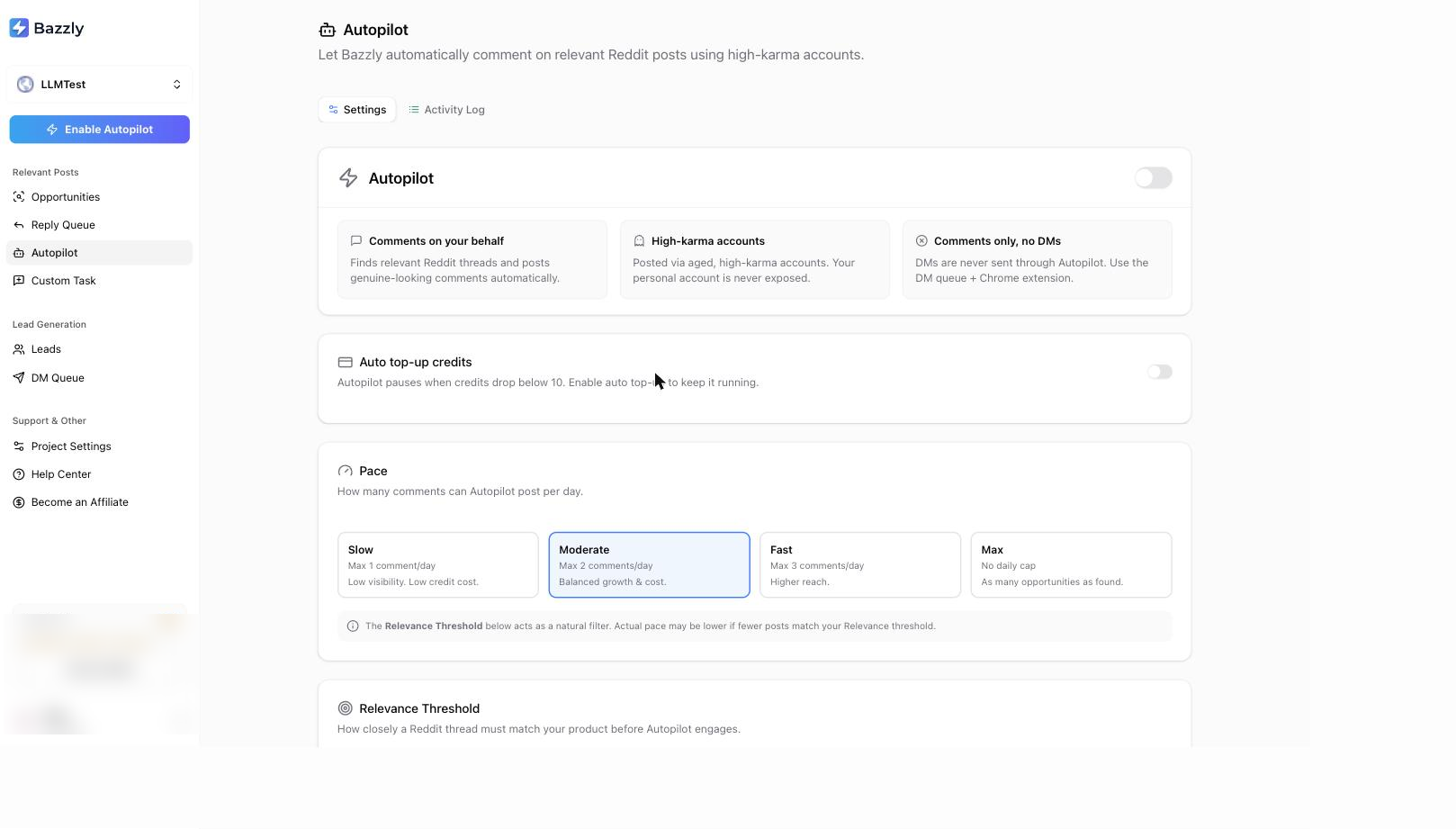
Autopilot settings — choose your pace and relevance threshold, then let it run hands-off.
With Autopilot on, Bazzly continuously finds relevant posts and comments for you, through warmed-up accounts, without manual approval. (Autopilot only comments — DMs are never sent on Autopilot; those run through the DM queue and the browser extension.) You stay in control of:
- Pace — how many comments Autopilot can post per day: Slow (~1/day), Moderate (~2/day), Fast (~3/day), or Max (no daily cap, as many as it finds).
- Relevance threshold — how closely a Reddit thread must match your product before Autopilot engages. A higher threshold means fewer, more on-target comments.
- Target — which threads it replies in: All posts (default), Recent posts only (fresh threads, lowest removal rate, most immediate traffic) or Top-ranked only (older threads ranking on Google, long-term search traffic, highest removal rate).
- Smart upvotes — whether to add upvotes so your comment climbs toward the top of the thread.
You can also enable auto top-up: Autopilot pauses when your credits drop below 10, so turning this on replenishes them automatically and keeps it running.
What each action costs
Everything on Bazzly runs on credits. Your plan includes 170 credits, refreshed every month. Unused monthly credits expire. You can top up anytime ($1 = 1 credit); topped-up credits never expire, and monthly credits are always spent first, so purchased credits are never wasted. The common actions:
| Action | Cost |
|---|---|
| Warmed-account comment | 10 credits |
| Upvote | 0.2 credits each |
| AI draft (reply or DM) | 0.1 credits |
So a warmed-account comment with 5 upvotes costs 10 + 1 = 11 credits. Autopilot generates its replies for free, so you only pay for the comment and any upvotes. If you run out, Autopilot simply pauses until your credits reset or you top up.
Where to go next
- Leads & DMs — beyond commenting, Bazzly finds Reddit users who fit your product so you can reach out directly. This runs through the browser extension.
- Browser extension — install it to send DMs and to post from your own account. It's available for Chromium-based browsers (Chrome, Edge, Brave) through the Chrome Web Store.
- Project Settings — refine keywords and subreddits as you learn what converts.
If you get stuck at any point, email us at support@bazzly.ai or reach out on X — we're happy to help.
Frequently asked questions
- Do I need a Reddit account to use Bazzly?
- Not to get started. Replies are posted through Bazzly's warmed-up accounts by default, so you can run comment campaigns without connecting your own Reddit account. You only need your own account if you want to post from it directly or send DMs using the browser extension.
- Will using Bazzly get my Reddit account banned?
- No. When you use warmed-up accounts, your own account is never involved, so there's no risk to it. If you use the browser extension to post from your own account, just follow each subreddit's rules — breaking them is what gets accounts suspended, not the tool itself.
- How many opportunities will I get per day?
- It depends on your niche and how active your tracked subreddits are. If volume is low, try adding larger or additional subreddits, and broaden your keywords slightly. Quality of matches matters more than raw count.
- How long until I see results?
- Opportunities start appearing as soon as Bazzly finishes its first scan after you create a project. Getting traffic and leads from your replies is an ongoing effort — the more relevant your replies and the better your keywords, the faster it compounds.
Was this article helpful, or still stuck?
Contact support